
- Sales: 866.780.4678
- Sales Chat
- Get a Quote
Hosting Solutions - 2010 Finalist
Exchange Support
- you are here:
- Fpweb.net
- Support
- Exchange Hosting
- configure Iphone
iPhone Exchange Mail Support from Fpweb.net
How to Set up Exchange ActiveSync on your iPhone 3G in less than 5 minutes.
iPhone connects to Microsoft Exchange the moment you sign up for Fpweb.net Exchange hosting service. The best part is how easily it configures for an enterprise-wide deployment. Wirelessly push company email, events, and contacts - all secured over fpweb's reliable SSL Exchange network.
Setting up Fpweb.net Exchange Email on your iPhone 3G is easy with these step-by-step instructions.
Setup Instructions

NOTE: Once the slideshow launches, simply click on the right side of an image to advance to the next step, or the left side to go back.


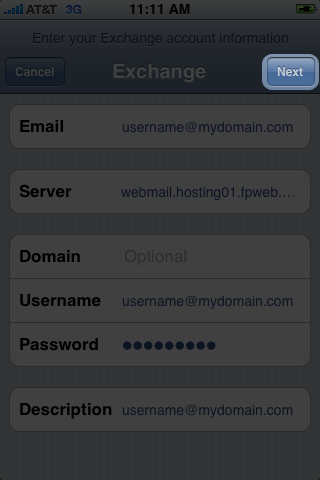

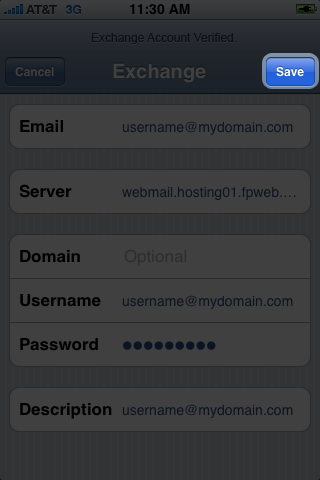
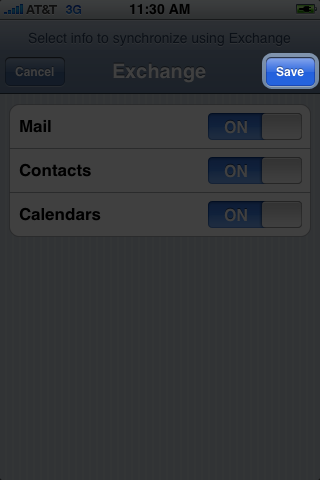
FREE Exchange ActiveSync
Included with any of Fpweb.net's Exchange hosting plans is ActiveSync. This allows you to turn on your iPhone and immediately read email, accept meeting invitations, and find contacts in your company directory. Combine Exchange with iPhone today - and experience up-to-the minute calendars, more powerful contacts, and more enterprise applications; iPhone for your enterprise.
We understand affordable.
Get signed up today for Exchange Hosting
and we’ll shave 10% off your purchase price
when you
sign up for our annual hosting

Got some questions for us?
Excellent. We’d love to give you some answers
about Exchange Hosting from Fpweb.net.
Get your questions about Exchange Answered